Download Gratis Aplikasi HP Handphone java symbian smart phone, pda tanpa registrasi, 100% gratis. Aplikasi Handphone. download gratis aplikasi hp mulai dari java, symbian (.jar, .sis, theme hp) dll. download gratis aplikasi hp ada game game hape terbaru .jar java .sis .exe : -antivirus -jamesbond quantum of solace -madagascar 2 -kamus indonesia inggris -pdf reader -aplikasi islami dan masih banyak lagi dijamin gratis ADA PULSA GRATIS JUGA LHO

Custom Search

Followers


WARNING : ALMOST ALL CONTENT IN THIS BLOG IS ILLEGAL AND WE ARE NOT RESPONSIBLE TO THAT. THIS BLOG IS MADE TO MAKE THE USER FEEL EASY TO FIND OUT THE APPLICATIONS THAT IS SUITABLE WITH THEIR MOBILE PHONE.

THE SOURCE IS VERY VARIETY FROM MANY OF SOURCES SUPPLIERS.THANKS TO ALL ALL OF THEM.

WE SUGGEST YOU TO BUY ORIGINAL CONTENT FROM ORIGINAL WEBSITE.
Showing posts with label applications. Show all posts

Monday, September 10, 2012

How do I Recover a Dead BlackBerry?

How do I Recover a Dead BlackBerry?
When your device fails to start, it show one of these symptoms:

1. Totally dead.

2. Trying to restart, LED activity only.

3. Failed to start, a white screen with an error message.

__________________________________________________ ________

1. Physical damage, water is the worst enemy of delicate electronic device. Try drying it with a desiccant and replacing the battery. If there is no activity, you can still try the last ditch technique, nothing to loose anyway.

2. Your device is not able to start, something has gone wrong and the OS is corrupt.

Failed Upgrade suggestions.
Link failed, Post #384 of this thread.

3. Geeks call this an "Uncaught exception error". That is a polite way of saying, the last thread has terminated, the OS has halted because it is corrupt.

In many cases, the Application Loader can be used from Desktop Manager or Windows, see Ref #1 for the CrackBerry 101 discussion.

If that fails to connect, there is one final solution. Go Old Skool ...

__________________________________________________ ________

The good news, starting from scratch, you will be back in service in a couple of hours.

1. ...

2. You need to install a BlackBerry OS file that is specific to your device. The original version, as supplied by the carrier, is the safe choice, but you can use any model specific version. This is not supplied on your BlackBerry CD, Ref: 3 links to BlackBerry's download pages.

3. Once the OS has been installed, you have to prepare it for the device.

Select Start / Computer and select the Drive C: Icon.

Open Program Files / Common Files / Research in Motion / AppLoader.

Navigate to the bottom and delete the file Vendor.XML file.

4. You are now ready to restore your device. Verify that BlackBerry Desktop Manager is NOT running. Plug the device directly into the computer's USB port.

We are about to venture into the bowls of the beast. Windows is not suitable for this job, we are going to invoke the Command line interface with an option switch. This was the way all 'puters worked prior to Mcintosh and Windows.

Windows XP: Start / Run... / Command

Windows Vista: Start / Command (type this into 'start search')


You will see a black window similar to this. I have used UPPERCASE to highlight the typed commands.

Windows Vista

Quote:
CD \
CD PROGRAM FILES
CD COMMON FILES
CD RESEARCH IN MOTION
CD APPLOADER
LOADER /NOJVM
Windows XP
Quote:
CD \
CD PROGRA~1
CD COMMON~1
CD RESEAR~1
CD APPLOA~1
LOADER /NOJVM
When using Vista 64 bit operating systems the command should look like this...

Quote:
CD \
CD PROGRAM FILES (x86)
CD COMMON FILES
CD RESEARCH IN MOTION
CD APPLOADER
LOADER /NOJVM

When you hit enter at the last command a forced rebuild will start. No data or setting will be saved, however, they can be recovered from a previous backup.

5. Wait for it to finish.Thirty minutes is typical, do not interrupt it.

Once it has recovered, you can use Desktop Manager's Application Loader to customize it and restore from your backup files, if you have saved them previously.

Update: Members have reported success after numerous failures with the following technique:

Remove the Battery, then run the Loader program. It works.

Ref:
BlackBerry 101: How to Reload the Operating System on a Nuked BlackBerry | CrackBerry.com
Current BlackBerry Desktop Manager
BlackBerry Desk Top Manager
BlackBerry OS Source list

Version 1.1 Corrected EXE file name.
Version 1.2 Expanded troubleshooting and installation instructions.
Version 1.3 Detail command line instructions.
Version 1.4 XP specific command line.
Version 1.5 Vista 64 command line.
Version 1.6 Remove battery prior to running loader.

Thanks to acnst @ BlackBerry Forums
Credit to cmedeir for the XP command line.
Credit to Afterfreeze for the Vista 64 command line.
Credit to jamesyouwish for the no battery technique.
 

Read More..

Blackberry Bold 9700 OS 6 Leaked (Size: 154.86 MB)

As in the title,OS 6 for the BlackBerry Bold 9700 -LeAkEd NoN oFfIcIaL- I have not tried this update as i only have the curve 8520 so its not compat with my phone. This has been taken down from a lot of sites so for those who missed it.... Here it is ;-)


Read More..

Sunday, July 17, 2011

Blackberry Applications : Create-A-JAD - A tool to create JAD and ALX files

A tool to create OTAs (.jad) and/or Desktop Installers (.alx) for apps of your choice.


Create-A-JAD Instructions

1. Enter information requested (All are required except for description)

2. Drag and drop all the files needed for your app install into the white box under Files.

3. If you haven't already, enter the filename (no extension) and choose what type of install you need: .JAD is for OTA, .ALX is for Desktop Install, and Both does both of them.

4. Click Create It!5. Enjoy your new OTA/Desktop Install!


Get Your OTA Up and Running

1) Upload all .cods required, the .jad, and the .htaccess file created to your webspace

2) Go to the link to your .jad file from your phone

3) Install away!


To Use In Desktop Install

1) Copy and paste the created .alx file in your OS's folder (ie. 9530-v4.7.0.167_P4.0.0.205)

2) Copy and paste the .cod files into the Java folder (if you checked that box when creating the .alx) or into the same OS folder as step 1 (if you left the checkbox unchecked)

3) Install using AppLoader (Loader.exe) or Desktop ManagerIm

UPDATE 22.09.09:


- Add Save to option
- Add progress bar
- Add .bat to load app with Javaloader.exe
- Add Check for update
- Minor bugs fix

Now you can create .jad, .alx, .bat or all of them! Really cool!

Download:
Create A JAD1 | JAD2

Read More..

Friday, July 15, 2011

JAva Applications : Real Life Social Network

Turbi v4.0 {Real Life Social Network}


Tubri is a new kind of social network based on real-life relations which lets you socialize with different type of people differently. Why Tubri: It lets you create labels like: My Family, My Friends & My co-workers etc. and assign them to your people. These labels are private and nobody knows which labels you assigned them to. Labels let you share different photos/discuss different things with different type of people. A photo shared with "My Friends" will not be visible to people in "My Family" and others. A rapidly growing social network, Tubri lets you enjoy better control on your social life.

This is a free mobile application which you can download to socialize with your people on the go. This app lets you do these:

● Check out whats being posted in all your labels
● Find new people and add them to your people list
● Chat with your friends and people
● Post social updates in different labels
● Take photos from your phone camera, upload it to your Tubri albums and share easily with others
● View your Tubri photo albums, photos and share them with others
● View latest activities

Download:
Turbi | SN

Read More..

Wednesday, July 13, 2011

PC Suite For Android v1.7.8.229

PC Suite For Android v1.7.8.229
Requirements: MS Windows XP SP2 and all new version
Overview: PC Suite fully supports mobile phones on the iPhone, Android and Windows Mobile platforms. As long as you have PC Suite, massive resources are free to access.


Free!
PC Suite is totally free to use. Additionally, it offers free technical support, free resources downloading and installation. free paid mobile phone resources cracked and shared by friends on the internet.

Chat via SMS!
You can chat with your friends and family via the SMS online on your PC easily.

Gorgeous use experience!
We integrate the iPhone style in PC Suite to make you enjoy the most fashionable interface and feel the most considerate operation during your use.

Manage your smart phone easily and safely!
Back up and import contacts, back up and import call logs and SMS records, set the ringtones, themes and wallpapers, manage the system, memory and registry of the phone, install and uninstall software, manage schedule…you can manage all functions and settings on your smart phone.

Enjoy videos anytime
You can subscribe tons of Videos in PC Suite to Download in your iPhone and enjoy them with 91 Player (for iPhone)

Massive resources, free to install!
Wallpapers, ringtones, themes, softwares, games and eBooks, FREE is our eternal principle.

More Info:
Code:
http://www.softpedia.com/get/Internet/Telephony-SMS-GSM/91-PC-Suite-for-Android.shtml


Download Instructions:
http://depositfiles.com/files/t62z50bvj

Read More..

Monday, July 11, 2011

Android Applications Free Download: MyPhoneExplorer v1.8.1 + Client v1.0.10

MyPhoneExplorer v1.8.1 + Client v1.0.10

MyPhoneExplorer v1.8.1
Requirements: Android and WinXP+
Overview: MyPhoneExplorer is a powerful phone management software for your Desktop PC.


- sync your phone with Outlook, Thunderbird, Sunbird, Lotus Notes, Tobit David, Windows Contacts, Windows Calendar,...
- manage your SMS, Calllists, Apps, Files...
Connection via WiFi,USB-Cable or Bluetooth.
This is the client which is needed for phone, you'll need also the desktop-software which can be downloaded at http://www.fjsoft.at.

Recent changes:
- critical bug in calendar management fixed

Content rating: Low Maturity

Latest version: 1.0.10 (for all Android versions)

More Info:
Code:
http://www.appbrain.com/app/myphoneexplorer-client/com.fjsoft.myphoneexplorer.client


Phone Explorer is a powerful File Explorer, FTP Client, Task Manager, Text Editor and Battery safe info. It has functionality of five separated applications: -powerful file management tool with some features like copying, renaming and deleting of files and folders, changing attributes of files and folders, advanced file searching function etc. -FTP client that enables you to exchange data from a your Smartphone to any FTP server or vice versa. It supports operations like copying, renaming and deleting of remote file and folders. -Notepad-like text editor with features like Cut, Copy, Paste, Undo, Find, Replace, Goto line etc. It has also possibility to save the file in any folder on your Smartphone. -Task manager that enables you to see and stop any task on your Smartphone, including system and hidden tasks. -Battery status viewer enables you to monitor the state of your Smartphone.

Read more: Phone Explorer for Windows Mobile - Free Windows Mobile software downloads and software reviews - CNET Downloads http://download.cnet.com/Phone-Explorer/3000-2064_4-10442891.html#ixzz1RkjBzRvL

Download Instructions:
MPE | Apps

Read More..

Wednesday, July 6, 2011

Maemo Apps: TiEmu 2 (emulator for Ti89 and Voyage200)

Although there is a known application AlmostTI Graphing Calc Emulator, TiEmu2 application enables you to run the best TI calculator, the TI-89t - Voyage200.

The application does not exist in the known repositories so i made this guide how to install it.

I put all the files in a zip as I found there

Transfer the 6 files to N900 in MyDocs!

Open the X terminal:
sudo gainroot
cd MyDocs
dpkg-i libtifiles.deb
dpkg-i libticables.deb
dpkg-i libticalcs.deb
The sequence is important!

The installation can be done now by clicking the install file tiemu2_2.08-1_armel.deb at the file Manager!
(Or at the terminal giving dpkg-i tiemu2_2.08-1_armel.deb)

After the installation using a file manager, eg the FileBox delete the existing file ipaq_89t.skn located in /usr/share/tiemu2/skins
and then transfer the two files ipaq_89t.skn, ipaq_00plt.skn in this Folder.
(/Usr/share/tiemu2/skins)

Selecting the first option when you enter the application you will see 4 options listed as pedrom and version 0.81.
Personally I suggest to download the latest ROMS
Voyage ™ 200 (it has better environment than the Ti-89t) and the TI-89 Titanium.

After downloading the Roms by selecting ADD ... you can add them as an option and delete the other 4.....
It would be good to transfer the new Roms with FileManager at:
/Usr/share/tiemu2/pedrom/, where are the other 4.

Enjoy!

Download

Read More..

Tuesday, July 5, 2011

Maemo Apps: HACK WIFI NETWORK step by step guide for n900

Hello!
Tutorial Time!

I see a lot of people looking for help in the announcement thread.
I think that thread should be left for ideas, testing and development. Not help.
I am going to list up all required help here.
Post required help here..

BUT! Only if you have read and do everything written here!

Don't skip a single step and you won't need help! I SWEAR!

Pre Stage:
xTerm and Type:
Code:

sudo apt-get moo

Without this: You can not gain Super Cow Powers!

First thing is first!
Open Package Manager and install "rootsh".
Install: Power kernel

Then:
Xterm:
Code:

sudo apt-get install python
sudo apt-get install aircrack-ng
sudo apt-get install nano
sudo apt-get install sudser
sudo apt-get install John (John the Ripper)

Main Parts!

Step 1:
Donate lxp for the wifi drivers to get the files.
You will receive the drivers. Or find these elsewhere.
or form here

Step 2:
When you received these (140MB'ish) drivers and downloaded them to (or copy) your MyDocs [N900], File = wl1251-maemo-0.1.tar.gz.

Step 3:
This is also in the Readme file

Installation:
Open X Terminal

type the following commands to untar the file:
Code:

cd MyDocs
/MyDocs$ tar -xzvf wl1251-maemo-0.1.tar.gz

Step 4:
Driver Time:
Code:
Code:

cd /MyDocs
sudo gainroot
cd /home/user/MyDocs/
cd wl1251-maemo/binary/kernel-power

Time to install!

Code:

/home/user/MyDocs/wl1251-maemo/binary/kernel-power: dpkg -i kernel-power_2.6.28-maemo46-wl1_armel.deb

Code:

/home/user/MyDocs/wl1251-maemo/binary/kernel-power: dpkg -i kernel-power-modules_2.6.28-maemo46-wl1_armel.deb

Code:

/home/user/MyDocs/wl1251-maemo/binary/kernel-power: dpkg -i kernel-power-flasher_2.6.28-maemo46-wl1_armel.deb

Code:

/home/user/MyDocs/wl1251-maemo/binary/kernel-power: dpkg -i kernel-power-bootimg_2.6.28-maemo46-wl1_armel.deb

Step 5:
This step is only needed if you have multiboot on your N900

Code:

cd /home/user/MyDocs/wl1251-maemo/binary/kernel-power: cd /boot
/boot: mv zImage-2.6.28-maemo46-wl1 multiboot/vmlinuz-2.6.28.10power46-wl1

Code:

Next, create the file
cd /etc/multiboot.d/
nano 01-Maemo-2.6.28.10power46-wl1.item (or using leafpad)

Write this:
Code:

ITEM_NAME="Maemo 2.6.28.10power46-wl1"
ITEM_KERNEL=2.6.28.10power46-wl1
ITEM_MODULES=ext3

Ctrl (on touch screen) + W to exit and save

Select the kernel from the boot list:
Maemo 2.6.28.10power46-wl1

Now time for fAIRCRACK!

download the fircrack form attach below and extract the file on ur pc and u will find two file faircrack.tar.gz and hildon.tar.gz and now copy faircrack.tar.gz AND hildon.tar.gz to MyDocs on your N900.

Part 2:
Code:

cd /home/user/MyDocs/

Part 3:
Code:

mkdir FAS

Part 4:
Code:

cd FAS

Part 5:
Code:

tar -xzvf /home/user/MyDocs/faircrack.tar.gz

Part 6:
Make sure all the files have been extracted to the MyDocs/FAS/ directory and that the following folders exist:
By Typing
Code:

ls

and look for these folders

MyDocs/FAS/keys/
MyDocs/FAS/diction/
MyDocs/FAS/cap/
MyDocs/FAS/cap/WEP/
MyDocs/FAS/cap/WPA/

Part 7: (icon!)
Code:

cd .. (which brings you back to MyDocs/Or just goto MyDocs in xTerm!)

Part 8:
Code:

tar -xzvf /home/user/MyDocs/hildon.tar.gz

part 9:
Code:

sudo gainroot

Part 10:
Code:

mv faircrack.desktop /usr/share/applications/hildon/

Part 11:
Code:

mv faircrack.png /usr/share/icons/hicolor/48x48/hildon/

Usage (Direct Copy from Announcement thread):

---------------------- Usage ----------------------------------------

To run fAircrack, you can use the shortcut (recommended), or issue the following command:

sh /home/user/MyDocs/FAS/launch.sh

Bear in mind that if you are running it from xterm you will probably see a few warning messages like "*.cap does not exist" and "basename usage". This is a result of my messy coding and does not cause any problems. This will be fixed in v0.2.

WEP

Firstly a little background information from the aircrack wiki

"A little theory first. WEP is a really crappy and old encryption techinque to secure a wireless connection. A 3-byte vector, called an Initalization Vector or IV, is prepended onto packets and its based on a pre-shared key that all the authenticated clients know... think of it as the network key you need to authenticate.

Well if its on (almost) every packet generated by the client or AP, then if we collect enough of them, like a few hundred thousand, we should be able to dramatically reduce the keyspace to check and brute force becomes a realistic proposition.
MUST READ THIS IT WILL HELP U TO CRACK WEP AND WPA KEY

First things first, from the 'Monitor' tab enable the packet injection drivers and then monitor mode. At the moment there is no way to check if the drivers are enabled or not so if you aren't sure then just click the enable button anyway.

Next, you will need to click on the 'Access Point' tab. From here select how many seconds to run a scan for (default is 5) and click the scan button. Make sure the WEP button is highlighted to show only WEP networks. Select your desired target and click the "Start Packet Capture" button. This will load airodump in an xterm. Be sure to leave this window open until you are ready to crack.

Now you must click the "Authenticate" button to attempt to authenticate with the network, which will allow you to perform packet injection. This will launch a new xterm which will display information about your authentication request. If you see a line similar to "AID 1 :-)" then all is good. If not, try changing your mac address to the same as an already authenticated client (you can see them at the bottom of the airodump xterm). Bear in mind that changing your mac requires the stopping and starting of your interface and it WILL close your airodump window

Once authenticated, click the "Injection" button, this will launch a new xterm and start listening for ARP and ACK packets. As soon as a ARP packet is captured it SHOULD start re-injecting it at about 500pps (packets per second). At this point the number of ARP requests should start to skyrocket! If injection starts but the ARP number remains static, it means you need to authenticate with the router. Leave the authentication and injection windows open.

To check how many IVs you have successfully captured, click on the "Decryption" tab, and select your current CAP file from the list. This will be the name of the network and a number. Now click the "Decrypt" button. It will load aircrack in a new xterm and after reading the packets it will display how many IVs have been captured and attempt to crack the key. You will normally need at least 50,000 IVs in order to perform a successful decryption, so if it is much less than this then you may as well close this window.

Once you are ready to crack, press the decrypt button and if you have enough IVs, the password should be broken in seconds. At this point the aircrack xterm will close and you can view the key by selecting it from the list and clicking the "Show Key" button. If it doesn't show up, just press the "Refresh" button. (Keys are also stored in your MyDocs/FAS/keys/ directory).

If all went well then the whole process should take around 8-15 minutes.


WPA

WPA is different. Read the FAQs for more information.

First scan for networks as before and select WPA to display the WPA access points. Now click on which one you want to crack and press the "Start Packet Capture" button.

Now you will have to wait for a client to connect to the access point, at which point you will see a message in the top right of your airodump window saying "WPA Handshake" followed by the mac address of the router.

Now click on the "Decryption" tab. From here select the current cap from the list (being sure to select WPA and not WEP), now select either a dictionary or specify an attack method for John. When you are ready, highlight either "wordlist" or "john" and press decrypt.

------------------------------ FAQs -----------------------------------

Q. It keeps asking me for a password. Wtf?
A. Install Sudser

Q. What's an access point?
A. Wireless router.

Q. What will I use this for?
A. If you don't know the answer to that then you don't need it.

Q. Why do I keep receiving deauth packets when authenticating?
A. I assume this is due to router security. Try changing your mac (from the main menu) to match a client that is already connected. You can find this from the already opened airodump window.

Q. Why am I not receiving any ARP packets when trying to perform injection?
A. Depending on the access point, it may be very difficult to capture/relay ARP requests, particularly if:
> You are not close enough to the access point.
> There is no traffic on the access point.
I find the number starts rising rapidly as soon as a client connects.

Q. I have tried everything, but just cannot inject/authenticate/anything. What gives?
A. Unfortunately, each make/model of router is different and no matter how hard you try you may not be able to get into it. fAircrack includes the settings that in my experience have been the most successful, but you may have better luck using aircrack directly and experimenting. (in future releases there will be far more options)

Q. Why is WPA so much harder to crack?
A. WEP encryption is weak. Each IV (initialization vector) contains a small portion of the key, so when enough of these are captured the key can be deciphered. WPA however is far more secure and cannot be "cracked". However, when an authenticated client connects to a WPA access point a "handshake" is generated. This handshake can be captured by airodump and aircrack can subsequently run a bruteforce dictionary attack against it, possibly finding the key (however if the exact key is not in the dictionary, it will obviously not work). To capture the handshake you can either wait for a client to connect, or you can launch a deauthentication attack (using my script) to force a client to disconnect and reconnect to the AP, allowing you to capture the handshake.

However, a word list big enough to 100% GUARANTEE to crack an 8-digit alphanumeric case-sensitive wpa key would have up to 62771017353866807638357894232076664161023554444640 34512896 different combinations. And this is WITHOUT symbols.

On the same basis, a 64-digit wpa key would have up to 39402006196394479212279040100143613805079739270465 44666794829340424572177149721061141426625488491564 0806627990306816 different combinations.

These wordlists would be thousands of terabytes in their totality.

In short, it's possible but not feasible. Bearing in mind that a device like the N900 could probably only check around 20-30 keys per second. The best you could do is capture the handshake with the N900 then use a desktop to attempt to crack the password.

Realistically, the only way you are going to bruteforce a wpa key is if the person who the network belongs to (obviously you ) has set something really mundane or stupid as their key. Any default key containing letters and numbers would be near enough impossible and take possibly years to break.

Enjoy. Press Thanks!

Credit goes to:FRuMMaGe for GUI


Download

Read More..

Monday, July 4, 2011

Hegazy N97 Ultimate v10.0 RM-505/507/506 All Languages Supported 22.0.110 Update


Please If You have Any Previous Version , Just Update To This The New And Maybe The Last Version As It's Highly Optimized And More Powerful

Please Delete ( Sys, Private , System, Resource ) Before Flashing And Hard Format To The Phone After Flashing Is Highly Recommended For Maximum performance
.

Change Log :-


1-Fixed Mass Memory Recolonization When Charging While The Phone Is Switched Off
2- Fixed Dot Symbols By Removing Any Fonts And Keep The Default Font Now The Version Is Really Multi Language
3- Fixed The Problems With Conversation App And Add It , Enjoy
4- Battery , Network Icons Removed As it Conflict With A lot Of Themes
5-Update Qibla App
6- Fixed Issues With The System Stability
7- Fixed Some Lags And Imported Some Original Files From C6 FW
8- Removed Scroll Till Push As It's Lags
9- Add N8 Scrolling And Fixed it
10- Ram Control App Removed
11- Increased The Total Performance To it's Maximum And Increase The Battery life

Thanks For Anayalater75 And Daniel For They Support And To Every One who Supported Me - Best Friends love You
Download:
Hegazy

Read More..

Sunday, July 3, 2011

How to Jailbreak iOS 5 On iPhone 4, 3GS, iPad, iPod touch

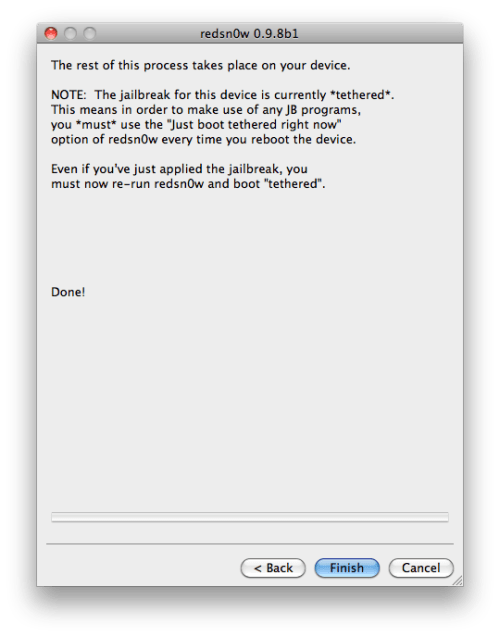
These are instructions on how to jailbreak your iPhone 4 on the 5.0b1 firmware using RedSn0w for Mac. Since iOS 5.0 has not yet been released these are instructions for developers only. This procedure will cause you to upgrade your baseband potentially ruining your chances for an unlock, it will not hacktivate so you must have your UDID registered with a developer, and it is tethered.


Step One
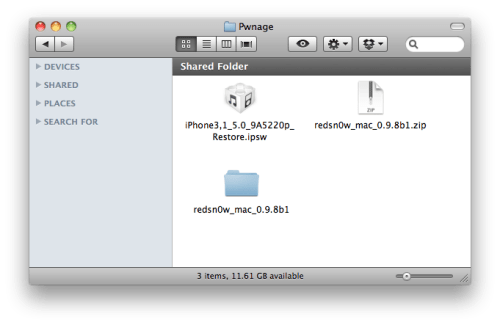
Create a folder on your desktop called Pwnage

Download RedSn0w and place it in the Pwnage folder. Likewise, download the latest 5.0b1 firmware from the iOS developer center and place it in the same folder.

5.0b1: iPhone3,1_5.0_9A5220p_Restore.ipsw

Extract the RedSn0w zip file by double clicking it.


Step Two
Connect your iPhone to the computer and launch iTunes.


Select your iPhone from the list of devices on the left. Now hold down Option and click the Restore button. Restore is preferred as it won't create any wasted space on your iPhone.


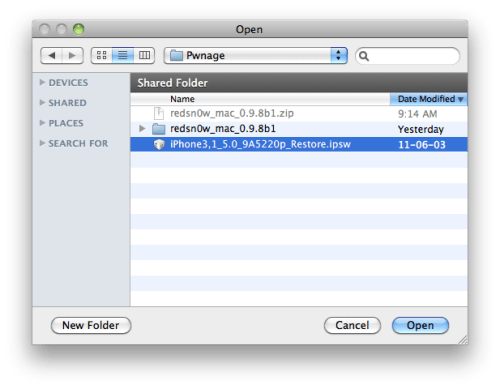
Navigate to the Pwnage folder on your desktop and select the 5.0b1 firmware ipsw. Click the Choose button to continue.


Step Three
Once iTunes has finished updating your iPhone to the desired firmware open the Pwnage folder on your desktop and launch the redsn0w application from the redsn0w folder we extracted earlier.


Step Four
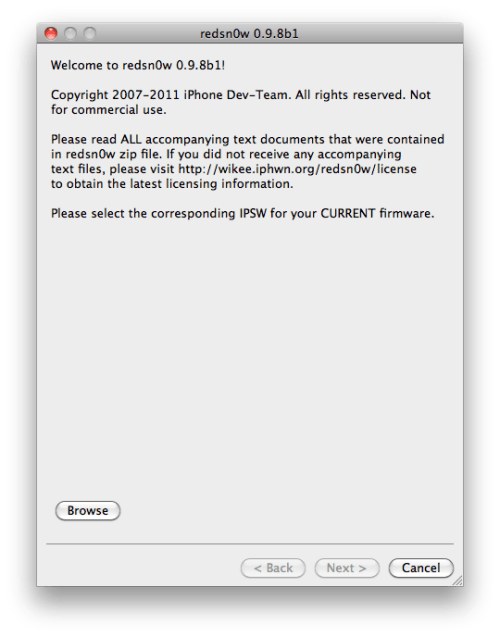
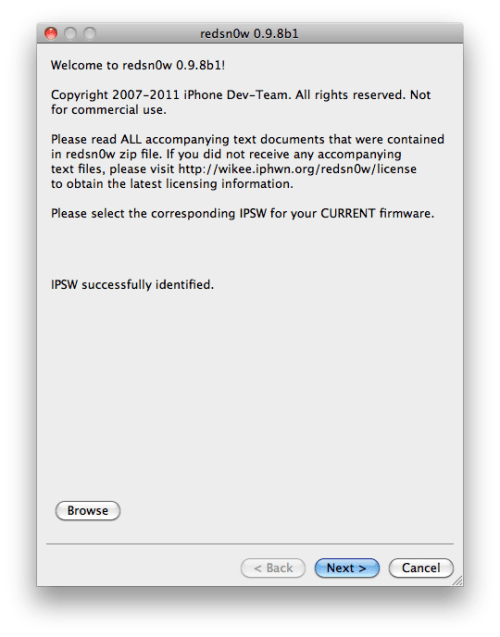
Once RedSn0w opens click the Browse button


Step Five
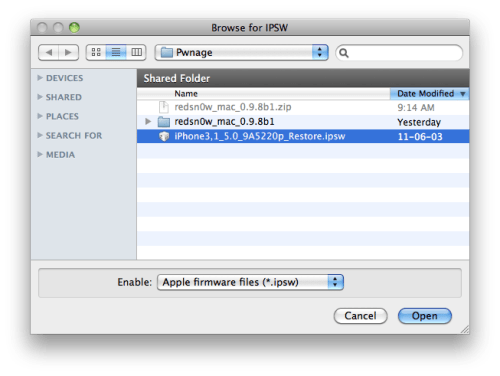
Select the 5.0b1 firmware ipsw we placed in the Pwnage folder on our desktop then click Open.


Step Six
Once the firmware has been verified click the Next button to continue.


Step Seven
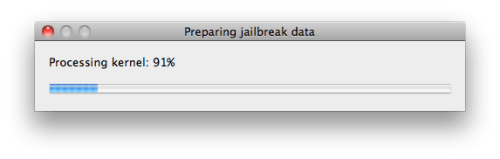
RedSn0w will now prepare the jailbreak data


Step Eight
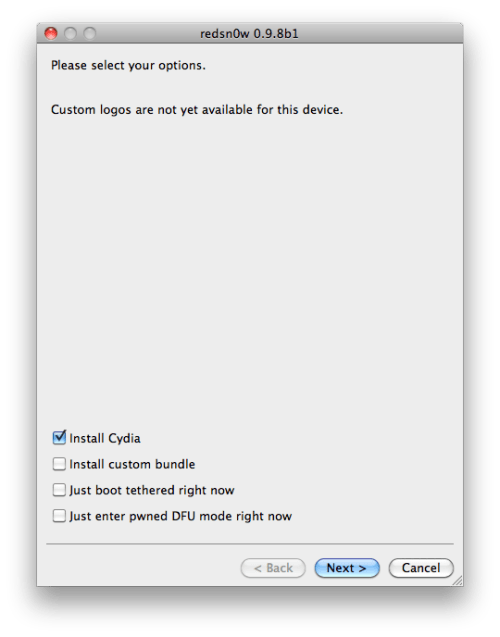
From this window you can select the jailbreak options you would like.

Make sure Cydia is selected and click the Next button to continue


Step Nine
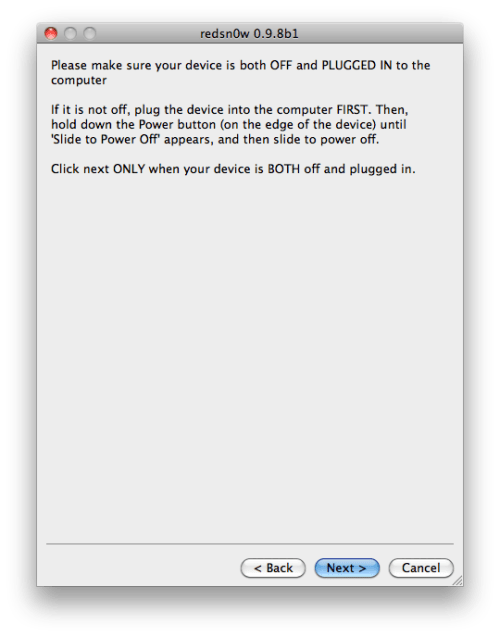
Please plug your iPhone into the computer and make sure its OFF then click the Next button


Step Ten
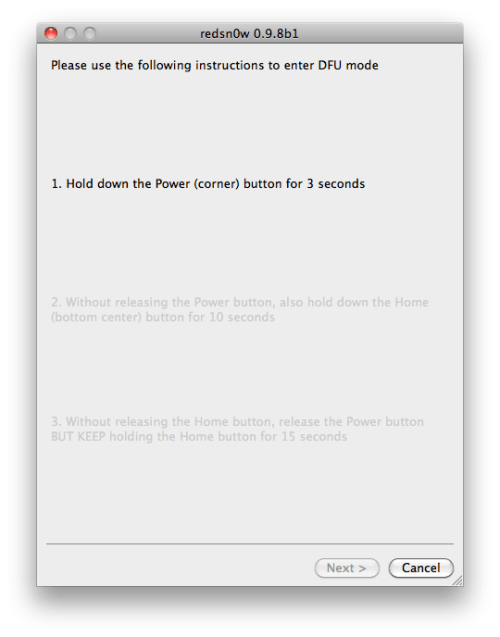
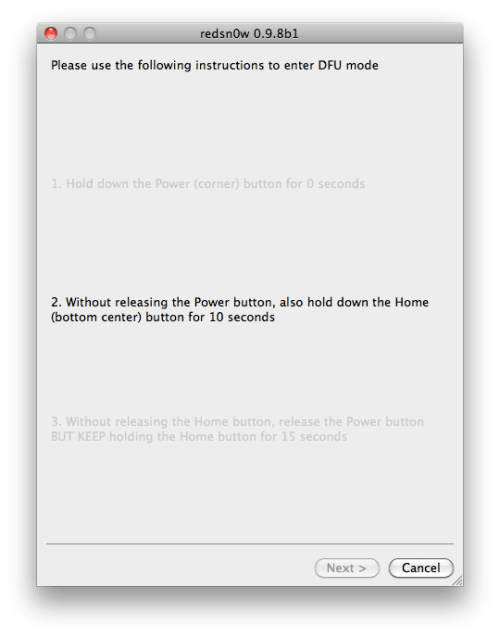
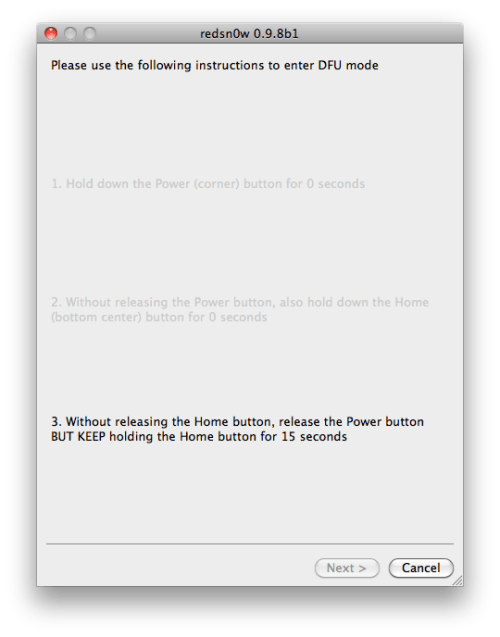
RedSn0w will now guide you through the steps to get into DFU mode. You can find more help with DFU mode here


Hold down both the Home button and the Power button for 10 seconds.


Release the Power button and continue holding the Home button until RedSn0w detects the device.


Step Eleven
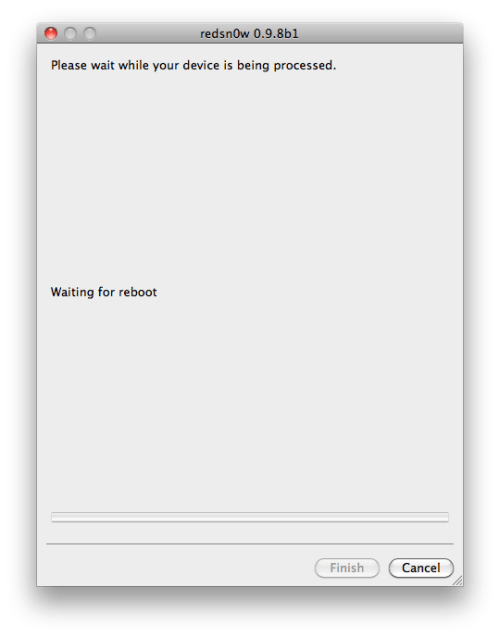
Your iPhone will now reboot


Step Twelve
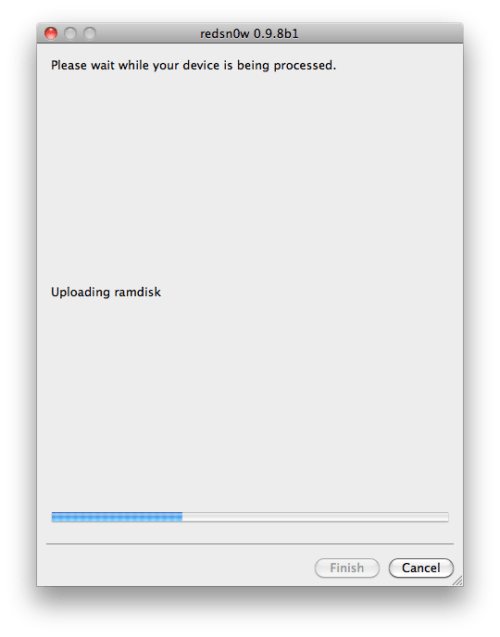
RedSn0w will then begin uploading the new RAM Disk and Kernel.


Step Thirteen
Once this is complete you will be notified that RedSn0w is done. Click the Finish button. When your iPhone finishes rebooting (5 minutes or so) it will be jailbroken with Cydia on the SpringBoard.


*As usual a big thanks to the iPhone Dev-Team and Geohot for their hard work and contribution to the iPhone community.

Download redsn0w 0.9.8b1 :

Red | Snow

Read More..

Saturday, July 2, 2011

Blackberry Applications : Documents To Go v2

Native Microsoft® Word, Excel®, PowerPoint® & PDF files on your BlackBerry® Smartphone


Documents To Go Premium Edition is an all-in-one solution that provides users with the ability to view, edit and create Microsoft Word, Excel and PowerPoint files and attachments as well as view critical PDF files all on their BlackBerry smartphones. Also included is an easy to use desktop application offering bi-directional file synchronization and providing users with a simple way to transfer and manage important documents.

What's New in Version 2.0?

- Desktop Application for File Synchronization: Windows users can now easily sync files between their computer and device via USB cable. Once the files are set to sync, any edits made will automatically be transferred upon synchronization.

- Enhanced PDF To Go: Updated version introduces many new features including: find and copy text, save as, send via email, bookmarks and more!

- Documents To Go Files: Smartphone file browser where users can access and manage (delete, rename, copy and paste) all of their Microsoft Word, Excel PowerPoint, Adobe PDF, and graphics in one centralized location.

- Open Password Protected Office 2007 Files: Open Microsoft Word and Excel (97-2007) files that are protected by a password.


Why Choose Documents To Go?

- Full featured: Documents To Go is not just a viewer, it's a complete solution with a full range of viewing AND editing features.

- Powered by InTact Technology: DataViz' acclaimed technology is the first and only way to ensure all original file formatting is retained once a file has been edited on a smartphone and forwarded on.

- Native: Open Word, Excel and PowerPoint files on your BlackBerry smartphone without any desktop or server conversion needed. Whether you receive files via email, the internet, Bluetooth or a media card, native document support means you'll always be able to open files regardless of how you get them to your device.

- Integrated: Documents To Go is tightly integrated with BlackBerry Enterprise Server 4.1.5 and BlackBerry Internet Service 2.5 for quick and easy native attachment downloading and uploading as well as support for existing IT policies, including new policies specific to Documents To Go functionality.

- Nothing new to learn: Documents To Go was designed and developed with the BlackBerry user in mind. Everything from SureType® to contextual menus to BlackBerry shortcuts are supported for a familiar look and feel.

- Native PDF too! PDFs are a mission-critical format many businesses need to support. Now through a bonus application called PDF To Go®, Premium Edition users can use native PDF files and attachments with ease.

Download:
PDF To Go
Documents To Go 2.0
documentstogo_2.0 PC
Serial.txt

Read More..

Friday, July 1, 2011

Blackberry Applications : TuneInPro v2.1.0 for OS6 and above

Name:  BBScreenie2011_06_15_06_31_12.JPG
Views: 607
Size:  20.7 KB

Having music in my pocket with me while on the go is definitely something that I find to be a necessity, and while I don't like to load my SD card up with tons of music, I do like to have a variety with me in case I am in the mood for something different at that time. Some local radio stations play quite a nice mix of music around me so at times I find myself wanting to listen to the radio, but while not near a car or a desk it can be a bit hard -- that is until TuneIn Radio. We have previously talked about TuneIn Radio, but they now have a Pro version which allows users to record the radio content or to pause the live radio if they wish, which are pretty handy features for users on the go. Whether a casual radio listener, or a music lover, this is a must have for all BlackBerry devices!
Features:
Listen live to your favorite radio stations (only those who allow streaming)
Find new radio channels on local, global and Internet radio.
Find your faves with over 40,000 channels of music, sports, news, podcasts and national networks like BBC, NPR, SWR.
Your account at RadioTime and on Tune-in App are seamlessly synced. So the stations added online as Preset appear automatically within the app. (Make sure you login to RadioTime within the app.)
This app has got really good user rating and I personally have been using it for couple of days. Best thing is that I can listen to some Indian radio stations like Radio Mirchi and all. So use it for some days and I am sure you are gonna love it.


Download:
Tune | In

Read More..

Thursday, June 30, 2011

Blackberry Applications : Yahoo! Messenger One v0.22.14 (Beta)

Yahoo! Messenger One BETA v0.22.14


Get social over the long-established, well-rounded chat and VoIP client Yahoo Messenger and you'll find drag-and-drop capabilities and contact importing from friends other IM, e-mail, and social-networking accounts who are also on Yahoo chat. Another favorite trick is the ability to see images and videos displayed inside the chat window when you or a pal drops in a public URL.
Yahoo Messenger 10 adds some visual enhancements that call out VoIP and video chats on the conversation window. Tweaks in the buddy list showcase an updates tab that operates as a newsfeed for friends' status messages. Other visual refreshes to version 10 spruce up select icons.
Users should note that the download stub will finish installing the program online, and that the download bundles the Yahoo Toolbar. In the preinstallation window, click over to Custom Install to deselect add-ons you don't want. We could also live without the heavy-handed Yahoo branding, and it would be nice to see a link to hidden smileys in the emoticon drop-down, but these are minor niggles when weighed against the benefits of an easy-to-use, feature-rich chat client that only continues to improve.
OTA ==>>


Download:
Yahoo | Messenger

Read More..

Wednesday, June 29, 2011

Blackberry Applications : Financial Calculator – Multi Purpose Calculator


Financial Calculator is a quick and multi-purpose calculator for brokers, lenders, realtors, businessman or investors.
Financial Calculator combines all the frequently used calculation together such as Mortgage, Investment, Retirement, Salaries, Tips, and Discount to make your business or life more convenient.

Features:
1) Mortgage calculation to allow users to calculate their loan, total interest, and total amount should be paid for their loan, or monthly payment.
2) Investment calculation includes different formula calculation on investment to provide users an easy way to calculate their investment. It includes P/E ratio, EPS, NTA, and ROE Dividend Yield for Equity calculation. Besides that, Mutual Fund Units calculation, and Fixed Deposit Calculation are included too.
3) Retirement calculation is available to allow users to plan their future retirement, and the amount should invest or save now.
4) Salaries Calculation is provided as a way to understand more on your current salary or yearly income.
5) Tips calculation helps you to calculate how much should be paid, and tips percentage of the payment. It is available to calculate the payment of the bill for each person.
6) Discount calculation allows you quickly find out the final price after applying the store’s discount.

(OFFLINE)

Download:
Financial | Calculator

Read More..

Tuesday, June 28, 2011

Import and play Gameboy Advance Games (Gameboid)

Instructions:
-Download and install Gameboid from the Android market, the free version only limits you making save states (saving whenever you want outside the GBA games save system, to an external file) but the ture game save states work perfectly.

-Once installed connect your phone with the USB cable and mound the SD card.

-Download the GBA Bios file:
gba_bios.bin

-Download the game you want.
I recommend this ROM (games) Site:
Doperoms.com

Go to the Gameboy Advance section (GBA)
And search for the game you want.

-Once downloaded extract the zip file.
Use the inbuild windows extractor or a 3rd party tool like winrar or 7zip.

-Make a new folder in your SD card on your phone, name it GBA for convenience.

-Place both the rom(the game file, "x.gba" ) and the GBA bios file, in the folder.

-Unmount and launch Gameboid

-When you start it will ask you to load the bios file, do so, (navigate to the GBA folder on your SD card)
Or if you failed to load it earlier, go to setting and tap the "GBA Bios file location" at the top.

-Load the game you want from the GBA folder!

Volia! Your done!

Read More..

Monday, June 27, 2011

Opera Mobile PC Emulator 11 Windows

This software emulates Opera Mobile browser on desktop computer thus helping website developers to test their product on various mobile platforms and devices without needing all the expensive phones. In this version there are many predefined parameters to choose from

1. All the new major smartphone and tablet models have been added under profile (Motorola Droid X, HTC Evo 4G, Motorola Atrix 4G, SE Xperia X10, Viewsonic ViewPad 7, Samsung Galaxy Tab, Motorola Xoom, Nokia N900 etc).
2. All the current popular screen resolutions have been added to the predefined resolution list (QVGA, WVGA, WXGA, qHD etc)


Even if you are not a developer, you can still Install it and watch your blog/site load at any popular mobile screen on Opera Mobile browser.
Opera is a web browser and Internet suite developed by Opera Software. The browser handles common Internet-related tasks such as displaying web sites, sending and receiving e-mail messages, managing contacts, chatting on IRC, downloading files via BitTorrent, and reading web feeds. Opera is offered free of charge for personal computers and mobile phones.

Opera does not come packaged with any desktop operating system. However, it is the most popular desktop browser in some countries, such as Ukraine.Opera Mini, which is the the most popular mobile web browser, has been chosen as the default integrated web browser in several mobile handsets by their respective manufacturers.

Features include tabbed browsing, page zooming, mouse gestures, and an integrated download manager. Its security features include built-in phishing and malware protection, strong encryption when browsing secure websites, and the ability to easily delete private data such as HTTP cookies.

Opera is known for originating many features later adopted by other web browsers.

Opera runs on a variety of personal computer operating systems, including Microsoft Windows, Mac OS X, Linux, and FreeBSD. Editions of Opera are available for devices using the Maemo, BlackBerry, Symbian, Windows Mobile, Android, and iOS operating systems, as well as Java ME-enabled devices. Approximately 120 million mobile phones have been shipped with Opera.Opera is the only commercial web browser available for the Nintendo DS and Wii gaming systems. Some television set-top boxes use Opera. Adobe Systems has licensed Opera technology for use in the Adobe Creative Suite

Download:
Opera | Emulator

Read More..

Sunday, June 26, 2011

Symbian : SISContents v1.7.2 Build 67 {Tool for unpacking, editing and signing of SIS packages}

SISContents v1.7.2 Build 67 {Tool for unpacking, editing and signing of SIS packages}

SISContents v1.7.2 Build 67


SISContents is a tool that allows you to unpack, edit and sign Symbian 9 SIS packages (Nokia S60 3rd, 5th Edition and Sony Ericsson UIQ 3.x platforms are supported). It helps you to inspect the files contained in SIS package, to see certificates against which it was signed as well as to view the PKG script that describes the on-device installation process. You can also edit the contents of packages and sign them after that.

Key features:

● Read the contents and show information on SIS packages;
● Unpack files from SIS packages;
● Extract embedded components of packages as sis files (including certificates and signatures);
● View and save installation PKG script;
● Sign packages, show information on certificates (validity period, issuer, subject, etc.), and delete them from package;
● Edit package: modification of name, vendor, version, type of installation, supported platforms (devices), software dependencies, options is available. You can also add, replace and delete files/components containing in a package and change capabilities, UID3, SID of executables (i.e. exe, dll, ldd, etc.);
● Read the contents and unpack files from N-Gage packages;
● Extract and edit contents of mif files embedded in sis packages;
● View, extract images from and edit multibitmap (mbm) files embedded in sis packages;
● Modify themes for S60 platform.


What's new:

● Added ability to change animation mode for animated resources of SKN file;
● Added Turkish;
● Fixed some bugs.


Compatibility:

● Windows XP/2003 Server/Vista/2008 Server/Windows 7

Download:

SIS | Content

Read More..

Saturday, June 25, 2011

BlackBerry RightKey Master (BBRKM) v.1.4.0318 (Free for Windows Only)

BlackBerry RightKey Master (BBRKM)is a windows application for controlling your device. It's fully integrated with Windows' right-click context menu. If you need to deal with cod/jad/jar or something else, just right click on the file/folder and select the menu. You don't have to run any other program any more.

http://phantomberryatl.net/wp-content/uploads/2011/03/snap0061.png

Easiest way to install/remove CODs: BBRKM (BlackBerry RightKey Master) v1.4 released!!

FEATURES

All functions can be found on the right-click context menu. No need to run any PC program before install/remove BlackBerry apps
  • Install JAD/COD by double click on them!
  • Create ALX files for CODs
  • Multiple COD files support
  • Backup/restore 3rd party apps
  • Capture BlackBerry Screen and save as a PNG file
  • Convert JAR to COD
  • Wipe device
BBRKM is completely free.

REQUIRED
Win XP/Vista/Win7(32/64 bit) and all BlackBerry devices compatible
Visual C++ 2005 Redistributable Package
Microsoft .NET Framework 2.0 or above
Blackberry Desktop Manager or Drivers
Jar2cod needs BlackBerry JDE&JDK
INSTALLATION
Run BBRKM.*.exe as administrator. Please uninstall the old version before installing the new one.
UNINSTALLATION
Right click on “Start Menu” or any folder, select “BlackBerry RightKey Master”-”Help”-”Uninstall”.
THANKS xhotkey
Download:

BBRKM

Read More..

Friday, June 24, 2011

Android Applications Free Download: Psx4Droid 3.0.5

Psx4Droid 3.0.5
Requirements: Android OS
Overview: Psx4Droid is a Playstation 1 emulator for high-end android devices.

Download and Read the tutorial HERE
Changes:
I just pushed out an update for psx4droid, now at 3.0.5.

The save state bug is now fixed. It affected people on stock Android ROMs.

Through various bug fixes this release should allow more hardware on various Android ROMs to run psx4droid. I’m interested if this build fixes the following hardware to allow games to be played:

* Google Nexus S
* SE Xperia PLAY
* LG Optimus 2x
* Xoom / Honeycomb
* Dell Streak

Download:
Psx4Droid

Read More..

Wednesday, June 22, 2011

Android Applications Free Download: FPse Emulator for android v0.10.52

FPse for android v0.10.52
Requirements: ANDROID:2.1 and up
Overview: FPse for Android is the fastest and most compatible PSone (also known as PSX or Playstation 1) emulator for handheld devices.

Create an ISO image from your favorite games and enjoy playing them on your Android phone.

FPse features the following:
-High performance
-High compatibility
-High sound quality
-Real-time save states
-Audio track emulation (using .cue files)
-Force-feedback
-Dynamically loadable Overlay Pads
-Guncon emulation
-Analog Stick emulation (using touchscreen slide)
-Compatible with G-Sensor, Touchscreen and Hardware keys
-Supports .img, .iso, .bin, .cue, .nrg and .Z disc image formats

A few tips to improve your gameplay experience:
-in Landscape orientation DPAD and Main 4 buttons are activated, if you want to activate all others, go in menu/input/touchscreen and select others buttons.
-Create a default configuration by setting your desired options and then selecting “Default Config Save” in the System Menu.
-CALL, BACK, VOLUME UP/DOWN buttons can be assigned as PSone buttons but can be used is not assigned.
-Guncon emulation requires the A and B buttons to be mapped to Hardware keys. By default: L3 = A and R3 = B.
-SPUSync is required for proper sound quality in certain games such as MGS and FFVII.
-Frameskip set to 50 will avoid sound stuttering on load end device or with somes games that use much CPU.

What's New:
0.10.52 :
Crash when entering into Video menu definitively fixed! ( much thanks to Aiden).

More Info:


Code:
https://market.android.com/details?id=com.emulator.fpse


Download:
Emulator 

Read More..
SUBSCRIBE VIA RSS FEED FOR FREE AND FASTER LOADING

Enter your email address here:

Delivered by FeedBurner

compie

Custom Search
PlanetBlog - Komunitas Blog Indonesia
Design by gud kimchi-cı | MoneyGenerator by Newest Gossip | REQUEST APLIKASI HAPE KAMU DISINI