Dear friend,
lyk usual, it is the busy time for me
I've gotta go to campus in each day, doing some assignment (paper), presentations...,
It calls : a tough day
but I love it. Even I'm so busy, I still could chit chat with my lovely friends, hangout together, doing lil crazy things (such as karaoke song)...
It's fantastic moment ^^
My another routinity is :
facebooking, LoL
i like facebook. Y know, seems happy when we gotta connect each other from this Kool site, hihi
However, I've prepare several programs for y symbian-nokia s60v3 edition
Here are the lists :
1. Video Editor
Its Video Editor Signet
Now U Can Edit Ur Video With Cool Effect,
And Edit Also Photo Movie, lively from your symbian phone ( s60 v3)
2.Fingertip Access Ultimate SMS.v.2.0.1 S60v3 SymbianOS9.1 Cracked-illusion
Fingertip.Access.Ultimate.SMS.v.2.0.1.S60v3.Symbia nOS9.1.Unsigned.Cracked-illusion
Ultimate SMS satisfies all your SMS sending/receiving needs. It keeps all your SMS messages private and safe on your phone. It schedules automatic SMS sending for you. It filters out unwanted SMS by senders and contents you specify. It notifies you of new incoming SMS using customized alert tones for different phone numbers / contacts of your choice. It also can send encrypted SMS to people in a list of you own. It lets you create template SMS and assign hotkeys to those templates so that you send a predefined SMS by simply pressing some keys on your phone screen. It groups all your messages into conversation thread based on senders and receivers so that you can view messages in context.
With Ultimate SMS, you can also export all your incoming and outgoing SMS on your phone to a text file. All your incoming and outgoing messages are encrypted inside some internal database, and no body, no other applications can access those messages.
Major Features
* Keep all your SMS messages private and safe. All your SMS messages are encrypted inside internal databases. No other programs can gain access to them. In addition, you can specify a password for the application itself.
* Schedule SMS messages. You can specify as many time schedules as you need for a SMS message. The schedule can be a one-shot schedule, which will be discarded once completed, or it can be a repeating schedule, for example, sending messages on every Monday, Tuesday, or on every Sunday, or even everyday at specific times.
* Make template messages. You can make some ready-to-use messages, and later on when you need to send them, just press hotkeys and there they go. Easy and quick! The template messages are also available for use in message editor.
* Group SMS in threaded conversations. All your messages to or from the same mobile number will be organized in the same conversation thread so that you can view them in context.
* Filter unwanted SMS. You can define your own filter rules, such as a list of phone numbers, or a list of text patterns, and you won't waste your time on them any more.
* Customize alert tones. You can specify different alert tones for incoming SMS from different numbers so that you will know who sent the message by tone.
* Send SMS by hotkey. You can define a hotkey for a template you make. And simply pressing its hotkey anytime, the template message can be sent out. you can also bring up a SMS editor by pressing "*0*" anytime.
* Encrypt outgoing messages. You can choose to let application encrypt all outgoing messages, or messages to a list of phone numbers or contact groups, and then only people using the same application can view the messages.
* Dial mobile number. You can directly dial the mobile phone number where a SMS came from inside the application.
* Add a mobile number to contact book. You can directly add the mobile phone number where a SMS came from to your contact book inside the application.
* Allow long messages. The application will automatically split a message that is longer than SMS length limit into multiple messages, and assemble them into one message at receiver side using the same application.
* Export messages. You can export all your incoming and outgoing messages into a text file.
* Import messages. You can import all your messages before using this application so that those messages are safe and private as well.
Quick guide Please refer to user guide for further information.
The application consists of three main views: Conversation view, Template view and Schedule view. You can use navigation left/right key to switch views. There is also a Setting view where you specify your preferences of using the application, and it can be accessed by pressing Options->Settings. From the setting view, you can manage SMS filter view, Alert tone view and encryption view as well.
* Conversation View. Conversation view lists all incoming and outgoing SMS messages on your phone. SMS messages are organized by mobile numbers, that is, messages from/to the same mobile number within 12 hour window are listed as one conversation thread so that you can view them in context easily.
Press Options->Open will bring you to a detailed message view where all messages in a conversation are shown. You can also press center navigation key for the same operation.
* Template View. A template contains some ready-to-use text contents, and optionally some default recipients (mobile numbers).
A template can have multiple time schedules or can have a hotkey (key sequence) defined and you can easily send a template by pressing its hotkey.
If a template has default recipients defined, then when you press its hotkey, the template will be sent out to those recipients; otherwise, you will be prompted to enter destination mobile numbers.
* Schedule View. You can create a non-repating One-shot schedule. For example, you may want to send one single message to somebody on 4:00pm today. You can create such a schedule by picking a particular date and time. Once the schedule is completed, it will be deleted automatically.
You can specify a schedule for a template that repeats at a time interval you need. For example, you can specify a schedule to send someone a message on every Monday, Tuesday at 8:00 am, or on Every Sunday, or even every day.
* Setting View. Confirm hotkeys. If yes, then a dialog will pop up to ask for your permission when a hotkey is pressed to send a template.
Application password. If specified, the password must be correctly entered each time you launch the application interface from phone menu.
Auto start. If enabled, then the application will automatically get started upon your phone boot, and ready to send schedules or accept hotkeys and monitor all your incoming /outgoing messages.
Delivery report. If yes, for each sent out message, a delivery report will be requested from your service provider. It depends on your service provider's policy and may lead to extra messages.
Allow long messages. If yes, you can enter a SMS longer than 160 characters, and it will be split into multiple SMS's to send. The split messages will be assembled automatically at receiving side by UltimateSMS.
Show indicator. Specify whether to show an envelope icon on the top of phone screen after your press "Hide" and let the application run in the background. The icon can be configured to show all the time, never, or only when there are unread SMS.
Prompt for billable events.If yes, then you will be asked for permission each time a SMS is about to be sent manually or automatically.
Run in background. If yes, after you press ?Hide?, the application will run in background mode, and won’'''t show up in task list. It saves memory and resource usage in this mode.
SMS filter rule. You can filter out all messages, allow all messages or allow all messages from your contacts only. And if you choose "Filter by rule", then you can Press Options->"Edit SMS filter" to specify your own filter rules by phone numbers or text patterns.
Incoming SMS alert tones. Instead of being alerted by the same tone on all incoming SMS messages, you can specify different tones for individual contacts or contact groups.
Send encrypted SMS. If yes, all outgoing messages will be encrypted, and only people using the same application will be able to view the messages. You can choose "Encryption list" and only messages to those phones or groups in the list will be encrypted.
Download
video | fingertips

Saturday, November 21, 2009
Video Editor and Ultimate SMS Full CrackEd Symbian s60v3 Edition
Monday, February 23, 2009
Request Zone Part 2 SMS TIMER
Assalamu'alaikum
Gud day pal..!
Kemarin lalu ada yang request sms timer
Nah, berikut ada smstimer punyae mobi
Sebelum kalian liat review nya, lebih baik liat dulu cara nginstallnya yah
How to install :
(Application must be installed in phone memory)
1) A trial version only allow to send 5 messages After that smstime deactivated
2) then go to smstimer>activation> use 00000000
3)activated..
4)Restart ur cellphone
artinya kira-kira begini :
1.Aplikasi harus diinstal di phone memory
2.Gunakan dulu versi trial ini-->hanya mengizinkan 5 sms saja udah itu gag bisa
3.Lalu masuk ke smstimer-->activation-->masukkan 00000000
4.Aktifkan
5.Restart hape kamu
to the point yah.. langsung sedhot ajahhh...
MOBIMONSTER SMS TIMER 2.0
SMSTimer is an advanced SMS Scheduler application that can handle an individual SMS for 1,600 characters and upto 1,000 SMS at any one point. SMSTimer enables you to send scheduled SMS to one or multiple recipients. This application is tightly integrated with your contact book and native messaging user interface. You have detailed reports from the Sent Items and "real" delivery reports as sent by the network provider.
SMS Timer is not just limited to scheduling SMS, but you also have complete control on the Scheduled SMS. You can edit, delete or re-schedule the SMS at any time by opening the main interface of the application located in Menu > MyOwn/Applications and then clicking on SMS Timer icon. The application can also be enabled/disabled as per your requirements and supports delivery reports, as per your phone settings, in effect, a truly integrated SMS application.
SMS Timer application works on all Series 60 devices and all relevant Series 60 screen sizes.
Main Features:
-
Does not require a separate interface to send SMS. Uses the phones Messaging application.
-
Uses full SMS sending capabilities of the phone
-
Integrated with Sent Item settings
-
Integrated with Delivery Reports
-
Integrated with contact book and groups
-
Support 1,600 characters
-
Small footprint
-
Support all international languages
-
Can schedule 1000s of SMS for one time
| How to Schedule a SMS? | |||
| To schedule an SMS, simply open the messaging window of your phone (Menu > Messaging > Create new SMS ) and click Send . SMS Timer will auto detect that you are trying to send an SMS and prompt you if you want to send this SMS now or Schedule it for later delivery? • Select Send Now to send this SMS now, or • Select Schedule | |||
| Clicking Schedule will open another window which will prompt you to enter the date and time Click Save when finished Your message is now scheduled. | |||
| Re-schedule an existing SMS | |||
 | |||
| Open the SMS Timer icon (Menu > Applications/MyOwn >SMS Timer). This will open the main view of the application. | |||
| Click Options > Re-schedule | |||
| Please select Yes to proceed or No to cancel. | |||
| Re-enter the message details and click Options > Send. Open the SMS Timer icon (Menu > Applications/MyOwn >SMS Timer). This will open the main view of the application. | |||
| How do I activate/deactivate SMS Timer? | |||
| |||
| Click Options > Autostart > Enable/Disable This will enable/disable application on phone startup. | |||
| Click Options > Status > Enable/Disable This will enable/disable application current status. Quick Operations: • To clear all schedule lists, Click Options > ClearAll. • To clear individual entries, select the entry, click Options > Delete. • To clear multiple entries, click Options > Mark, repeat for all entries and click Options > Delete. • To view Help, Click Options > Help. | |||
How to Schedule a SMS?
To schedule an SMS, simply open the messaging window of
your phone (Menu > Messaging > Create new SMS) and
click Send.
SMS Timer will auto detect that you are trying to send an
SMS and prompt you if you want to send this SMS now or
Schedule it for later delivery?
• Select Send Now to send this SMS now, or
• Select Schedule
Clicking Schedule will open another window which will
prompt you to enter the date and time
Click Save when finished
Your message is now scheduled.
Re-schedule an existing SMS
Open the SMS Timer icon (Menu > Applications/MyOwn
>SMS Timer). This will open the main view of the
application.
Click Options > Re-schedule
Please select Yes to proceed or No to cancel.
Re-enter the message details and click Options > Send.
This will again ask you if you want to Schedule or Send this
SMS now.
How do I activate/deactivate SMS Timer?
Click Options > Autostart > Enable/Disable
This will enable/disable application on phone startup.
Click Options > Status > Enable/Disable
This will enable/disable application current status.
Quick Operations:
• To clear all schedule lists, Click Options > ClearAll
• To clear individual entries, select the entry, click Options > Delete
• To clear multiple entries, click Options > Mark, repeat for all entries and click Options >
Delete.
• To view Help, Click Options > Help
Compatible with :
Nokia 3250 | Nokia 5500 | Nokia 5700 | Nokia 6110 Navigator | Nokia 6120 | Nokia 6121 | Nokia 6290 | Nokia N71 | Nokia N73 | Nokia N75 | Nokia N76 | Nokia N77 | Nokia N80 | Nokia N81 | Nokia N81 8GB | Nokia N82 | Nokia N91 | N91 8GB | Nokia N92 | Nokia N93 | Nokia N93i | Nokia N95 | Nokia N95 8GB |
SMSTimer is an advanced SMS Scheduler application that can handle an individual SMS for 1,600 characters and upto 1,000 SMS at any one point. SMSTimer enables you to send scheduled SMS to one or multiple recipients. This application is tightly integrated with your contact book and native messaging user interface. You have detailed reports from the Sent Items and "real" delivery reports as sent by the network provider.
SMS Timer is springs into action every time you send a normal SMS from the messaging application of your phone and inquires if you want to send this SMS now or schedule it for later delivery. There are no limitations on the date, time, or the amount of Scheduled SMS that you can at any time. SMSTimer is infact the world's most advanced SMS Scheduler application as it is tightly integrated with the normal messaging window of your phone and you have access to sent "scheduled" SMS from the Sent Items of your phone.
SMS Timer is not just limited to scheduling SMS, but you also have complete control on the Scheduled SMS. You can edit, delete or re-schedule the SMS at any time by opening the main interface of the application located in Menu > MyOwn/Applications and then clicking on SMS Timer icon. The application can also be enabled/disabled as per your requirements and supports delivery reports, as per your phone settings, in effect, a truly integrated SMS application.
SMS Timer application works on all Series 60 devices and all relevant Series 60 screen sizes. To view a list of all Series 60 devices, please visit: http://www.s60.com and click on S60Devices in the top bar of the page. For more information visit: www.mobimonster2.com
download
Read More..
Wednesday, August 6, 2008
Download gratis aplikasi hp symbian java disini
Assalamu'alaikum prens
Gimana kabarnya?
Finally, my final project has O-V-E-R
Jadi bisa ngupdate nih blog lagi
Banyak banget request yang masuk ke email aquwh, trus juga via comment di fs.
Maap blun tak bales, tapi disini bakal ku suguhin ..yeah..not all of ur request, tapi..
dis is d best i culd du ^ ^
So, to the point ya...
Langsung sedhot ajahhh
Request Zone :
KD Player With Skins
KD Player For Sony Ericsson phones:
The KD player is a music player for Sony Ericsson phones which can be used instead of default Walkman player or normal player. This player has a feature to show album art, so in case you have a walkman v1.0 player then you might like to use this one. It can be installed on most of the SE sets with 176*220, 240*320 and 128*160 screen resolutions.
You can switch between various player skins without patching the firmware. I have included few skins below:How to install:
1. Download the KD player from below.
2. Copy it to your cell phone.
3. Install it.
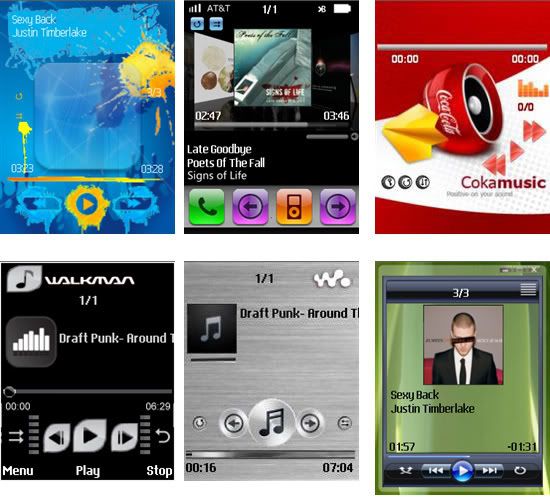
How to apply skins:
1. First copy the skin files to your ‘Other’ folder in your cell phone. (Copy both kdi and kds files)
2. Start the KD player.
3. Once main menu appears, go to menu> more> Change Skin > Open Skin File.
4. Now keep pressing select until you reach the ‘Other’ folder where you have stored the skin.
5. Select the skin and apply it.
KD Player has been tested on these phones: Sony Ericsson W810, K800, Z710. Nokia Series40: 5300, 6233, Series60: 5700
UltraMP3.S60.V1.40.WithKEYGEN
Overview
UltraMP3 is a music player for your mobile phone. It is a handy application with cool graphical user interface, allowing you to listen to your favorite music on your Symbian mobile device. UltraMP3 loads and plays music in MP3 format, as well as MOD, XM, IT, S3M. The player has built-in playlist editor, which allows you to arrange music files on your phone, and play them in any order you wish. High degree of customization allows you to choose from one of more available skins, and skin editor ships with application - in a few simple steps you may create your own skin. Handful of nice skins is shipped already with the application.
With UltraMP3, you may take your favorite songs everywhere with you. Additionally to mp3 playback, the player supports module music format - there're tens of thousands of module music freely downloadable from the internet - use links below and visit dedicated sites. If you have grown on Amiga and 386 PC should know what's module music about, if you don't know, just give it a try. The advantage of module music (over mp3 music for example) is that even on your memory-limited phone device, you may have hours of music available (approximately there're 2 hours of play time for 10 MB of files size). Anyway, today's size of MMC cards allows you to have one or two mp3 albums in your phone, so just upload it and listen.
Don't know what the module music is? No problem, to give it a quick try, you may download a song, and run it in Winamp (Winamp plugin for module music is included in it). There're tens of thousands of module music freely downloadable from the internet - use links below and visit dedicated sites. The advantage of module music (over mp3 music for example) is that even on your memory-limited phone device, you may have hours of music available (approximately there're 2 hours of play time for 10 MB of files size).

Features
User-friendly interface
Support for world's most-popular music format
Skinning allows you to customize your player
Playlist editor - manage your songs as you wish
Capable of playing module music (MOD, XM, S3M, IT)
Playback through Bluetooth headset
 SMS Timer v1.40 Full
 SMS Timer v1.40 Full

Overview
The receiver of the message is selected over the standard phonebook or an individual No. is entered. The standardized search function is present.
T9-Dictionary, special charakters and cut/copy/paste are likewise present. The program offers the possibility of dispatching up to 765 characters at any time.
Up to dispatching the SMS waits in the output box for sending at wanted point of time. At time of real sending, SMS timer must not be opened, but the phone must be on.
SMS Timer is easy to use:
If you select "Send SMS" the actual send process will go on with starting the phonebook.
The choice of a recipient happens about phonebook or giving in a number via "Another no".
For looking for a name, enter the first character of it and a input field for this looking is presented. You arrive the editor for entering your message text.
Here you have three possible choices: Cancel for going back to the phonebook (Text remains), cancel the whole procedure (you arrive the start point of program) or OK to come to the input for sending date and time.
In this version you're able for using the function of T9 completely. Also cut, paste and special chars functions in editor are integrated. The buttons of selections have been changed. In the editor you decide about going Back (see above) or OK like the previous version. Default of date and time are the current system time.


Jiangmin Anti-Virus Software for mobile phone version is designed to provide a safe environment for the operation of mobile equipment users of information security software excellent compatibility with the version of the smaller features and occupiers resources to be fully killing all cell phone virus, a Trojan horse smartphone virus protection from the threat and safeguard the information security of mobile equipment.
Language :
English, Simplified Chinese, Traditional Chinese
Handsets :
3250, 5500,
E50, E60, E61, E62, E70
N71, N73, N75, N80, N83, N91, N92、 N93、 N95
Note : its beta version and freeware but not updatable
Ogg player 1.72

File Format Supported:
Oggplay is able to use standard Symbian MMF plugins. MMF (Multimedia Framework) is a feature of Symbian Operating System that allows (among other things) 3rd parties to use audio decoder plugins. With MMF, Oggplay can use the phone built-in audio decoders (MP3, AAC, MP4), as well as decoders installed by users. The MMF comes bundled together with the Symbian OS 7.0S and above, in the phone firmware, and can't be installed in phones afterwards.
Ogg
MP3
Built-in Plugin
AAC Built-in Plugin
MP4 Built-in Plugin
Nokia 7710
Features:
Main features of OggPlay for Series 90 phones:
+ Plays .ogg audio files
+ Detects and plays audio format supported the phone (MP3, AAC, MP4, M4A)
+ Recognize Winamp playlist (.m3u)
+ Free!
+ Skins (you can make your own, or use already made ones)
+ User defined hotkeys
+ Autoplay
+ Frequency analyzer
+ Usual music player functions like shuffle and repeat
+ Ogg files can be used as ringing tone
+ Random ringing tones
Missing features:
Some features are not supported in the S90 port:
- Frequency analyzer only works for .ogg files
Alon.Mp3.Player.v1.00.UIQ.SymbianOS.Cracked-BiNPDA

ALON MP3 Player is audio player for Sony Ericsson which supports MP3 and WAV - the most popular audio formats.
Overview
Support MP3 and WAV - the most popular audio formats
High quality of playback
Built-in folder editor
User-friendly interface
Synchronised Flip opened and Flip closed modes
Change volume with Jog Dial
Start and pause playback with just one button press
11 tracks can be shown in the main playlist
FEW APPLICATIONS FOR nOKIa S80
link-aktif
total ir remote s80
The TV, HiFi set, CD, VCR and DVD player can be all controlled by your handy! You will not have to fight with your family members for a remote control anymore - you can just use yours!
You will spare time and effort on looking for lost remote control for your CD player and you will still keep in touch with the SMSes from your friends while watching TV.
Now the PsilocTotal irRemote gives you great opportunity to customize application according to your own equipment needs. In other words you are able to teach application by importing new device definitions from external files. The application accepts files in Philips Pronto CCF and Linux Lirc formats. Moreover imported code definitions can be attached to any key on any layout!
Now Psiloc Total irRemote can control hundreds of brands and thousands of devices!!!
With this unique universal Remote Control you can define your own set of devices you want to use! Your new universal irRemote does not have to learn anything - you just choose your brand from the list, then select device type (TV, DVD, VCR, CD etc.) and it works!
And you only have to do it once - unless you buy a new DVD?
The list of supported brands is long and contains following manufactures and their compatibles: Admiral, Aiwa, Akai, Allsat, Anitech, Apex, Aristona, Avex, Barco, Blaupunkt, Bush, CCE, Crown, Cyberhome, Daewoo, Denon, Elemis, Elitron, Finlux, Funai, Galaxis, GoldStar, Grundig, Hitachi, ITT-Nokia, JVC, Kenwood, LG, Lifetec, Loewe, Magnavox, Manhattan, Marantz, Mark, Matsui, Meliconi, Mitsubishi, Nec, Nokia, Onkyo, Orava, Orion, Panasonic, Philips, Phonola, Pioneer, RCA, Portland, Rubin, Samsung, Salora, Sanyo, Schneider, SEG, Sharp, Sherwood, SKY-Digital, Sony, Synudyne, Technics, TechniSat, Tesla, Thomson, Tivo, Toshiba, UK-Digital, UK-OnDigital, Universum, Watson, Yamaha, Zenith
Images Attached
All SymbianWare S80 and Keygen
+
SymbianWare Astronix v1.1 S80
SymbianWare CallRecorde v1.0 S80
SymbianWare FileGuard v1.1 S80
SymbianWare FSClock v1.0 S80
SymbianWare Full Screean Caller v1.0 S80
SymbianWare iLines v1.0 S80
SymbianWare MessageStrorer v1.02 S80
SymbianWare Outliner v3.01 S80
SymbianWare PowerClock v1.1 S80
SymbianWare PowerConverter v2.0 S80
SymbianWare PowerDates v1.3 S80
SymbianWare PowerDay v1.0 S80
SymbianWare PowerDesk v3.2 S80
SymbianWare PowerFile v1.4 S80
SymbianWare PowerNavigation2 v2.04 S80
 All SymbianWare S80 and Keygen
 +
SymbianWare Astronix v1.1 S80
SymbianWare CallRecorde v1.0 S80
SymbianWare FileGuard v1.1 S80
SymbianWare FSClock v1.0 S80
SymbianWare Full Screean Caller v1.0 S80
SymbianWare iLines v1.0 S80
SymbianWare MessageStrorer v1.02 S80
SymbianWare Outliner v3.01 S80
SymbianWare PowerClock v1.1 S80
SymbianWare PowerConverter v2.0 S80
SymbianWare PowerDates v1.3 S80
SymbianWare PowerDay v1.0 S80
SymbianWare PowerDesk v3.2 S80
SymbianWare PowerFile v1.4 S80
SymbianWare PowerNavigation2 v2.04 S80
SymbianWare PowerProfile v.1.2 S80
SymbianWare PowerSecure v1.0 S80
SymbianWare PowerSafe v2.0 S80
SymbianWare SBasic v0.9 S80
SymbianWare Smart vCard v1.0 S80
SymbianWare Stacker v1.01 s80
Download Now
SymbianWare PowerProfile v.1.2 S80
SymbianWare PowerSecure v1.0 S80
SymbianWare PowerSafe v2.0 S80
SymbianWare SBasic v0.9 S80
SymbianWare Smart vCard v1.0 S80
SymbianWare Stacker v1.01 s80
DownloAD PART 1
Download pArt 2
DownloAD Part 3
Use your N95 as a webcam: WWIGO
Wow!!! This is free software and it works like a charm!
Setting up is really simple and the result is that you can use your N95 as a webcam in under 3 minutes!
WWIGO [pronounced VIGO] is free software that enables you to use your S60 phone as webcam, in any camera related Windows application.
wwigo (pronounced ‘vigo’) stands for Webcam Wherever I Go. With wwigo, a camera phone can be used as a webcam with PC or Laptop using bluetooth as the transmission medium.
It consists of two software components.
- mobile component that resides and phone and streams video to PC.
- PC component that recieves video.
System Requirements.
- Desktop/Laptop with Windows 2000 or Windows XP SP2
- Bluetooth enabled with any one of these bluetooth Stack, Microsoft Bluetooth Stack, Widcomm Bluetooth Stack, Toshiba Bluetooth Stack
- Mobile Phone : Nokia Series 60 v2.0 or v3.0 phone.
So, here are the screens for the install:


And finally a screenshot of the N95 capturing the screen of the pc capturing what the N95 is capturing (yes, this is correct!)

So, easy does it!!!
Way to go WWIGO!!!

compie
